
October 31, 2026
How to Install a Doner Blade on a Universal Machine Step by Step
Introduction: Understanding the Mounting System in Doner Machines
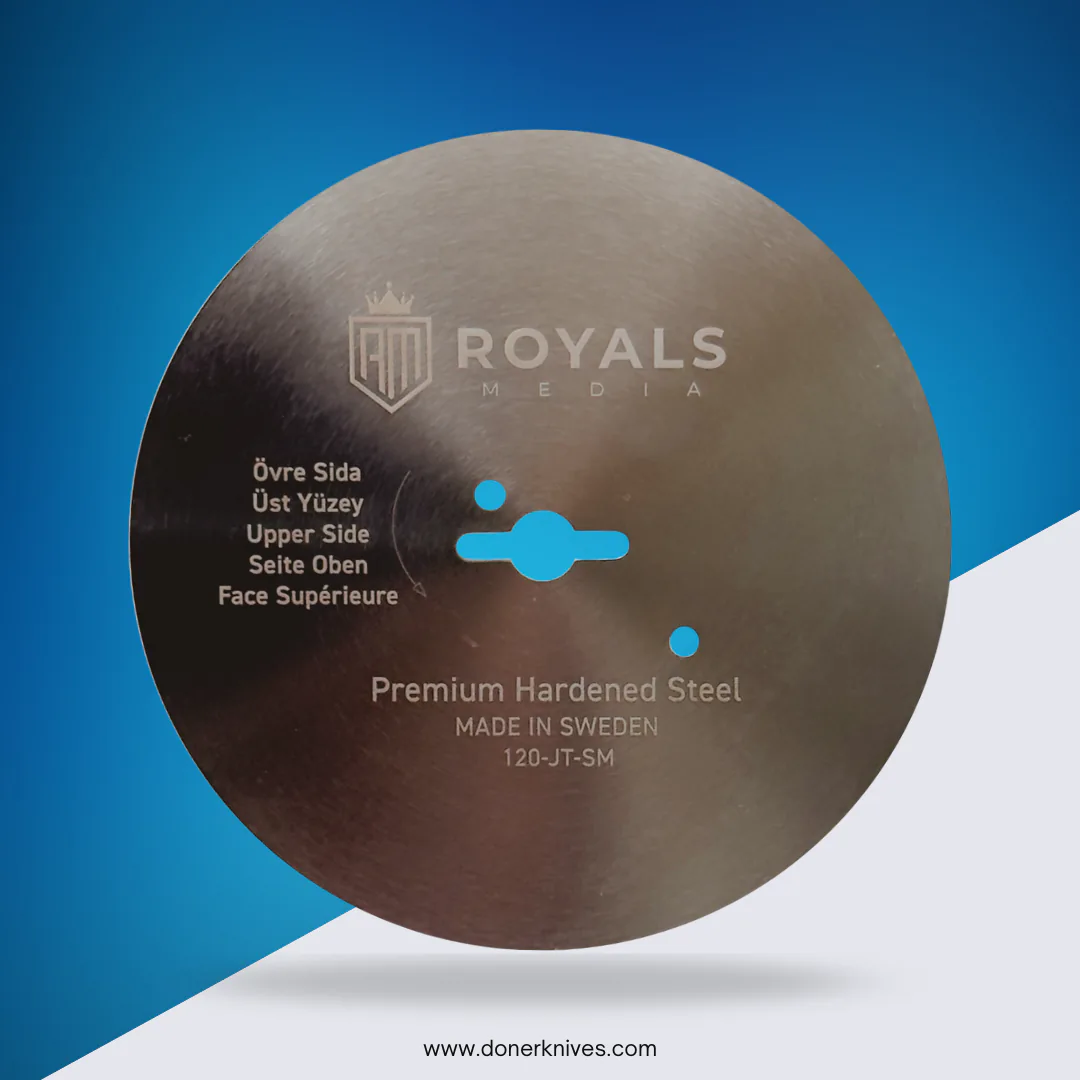
Before we begin explaining how to mount a doner blade on a universal machine step by step, it is essential to understand the nature of the mounting system these machines rely on, as it differs radically from installing traditional manual knives. The blade here is not a knife with a handle; rather, it is a circular disc made of stainless steel, mounted directly onto the electric motor's drive shaft.
The mounting system in Universal machines relies on a central keyhole-shaped opening in the middle of the steel disc. This opening is designed to fit the machine's shaft precisely, where the blade is secured by a nut or central screw that presses the disc firmly against the mounting base. The larger the blade diameter (80, 90, 100, 120, or 140 mm), the larger the cutting surface area, but the mounting mechanism remains based on one principle: the Universal machine's shaft passes through the central opening and is secured by tightening.
Note that the blade diameter is not a matter of preference; it is determined by the machine itself. A machine designed for a 90 mm blade will not accept a 100 mm blade, and vice versa. The cutting edge is the entire circumference of the circular disc, and all blades in this category are made of stainless steel, whether with a smooth edge for evenly slicing tender meat, or a serrated edge for frozen or firmer meat. Understanding this system is the first step to ensuring a safe and efficient installation, extending the life of both the blade and the machine.
Tools and Requirements Before Installing the Doner Blade
Before you begin executing the steps of how to mount a doner blade on a universal machine step by step, it is essential to prepare the correct tools and ensure the new blade matches your machine's specifications. Proper preparation prevents damage to the blade or shaft and ensures your safety while working.
List of Essential Tools
- A suitable screwdriver for loosening the mounting screws (usually an Allen key or Phillips screwdriver depending on the machine model).
- A clean, dry cloth to wipe the mounting surface and remove any grease or meat residue.
- Cut-resistant gloves to protect your hands from the blade's extremely sharp edge.
- The correct replacement blade: Ensure it is a circular stainless steel disc, with an exactly matching diameter (80, 90, 100, 120, or 140 mm), and the appropriate mounting type (central circular opening, keyhole "Universal" opening, or 2-3-4 screw holes).
Compatibility Check
Before purchasing, compare the old blade with the new one in terms of:
- Outer diameter: Must be identical.
- Mounting type: If your machine is a "Universal" type, you will need a blade with a keyhole opening as in the 90 mm Universal blade or the 140 mm Universal blade with 2 holes depending on your machine's size.
Don't forget to wash the new blade by hand only with warm water and soap, and dry it immediately before installation. Never use a dishwasher because chemical detergents attack the cutting edge.
Steps for Safely Removing the Old Blade from a Universal Machine
Before starting any replacement process, make sure to completely disconnect the machine from the power source. This step is non-negotiable — the doner blade is circular and sharp along its entire circumference, and any accidental activation could cause serious injury.
Preliminary Preparation
- Clean the work area: Remove meat and fat residue around the mounting shaft with a dry cloth.
- Prepare the tools: You will likely need a wrench (Allen) or a suitable screwdriver for the mounting screws, and cut-resistant gloves.
- Take a photo: Before loosening anything, photograph the blade from both sides and from the side. This photo will serve as your reference when installing the new blade, especially for remembering the installation direction and the position of the mounting holes (whether a central hole or 2, 3, or 4 holes as in the 140 mm sizes).
The Removal Process
- Remove the protective cover: If present, carefully remove it and set it aside.
- Loosen the shaft nut (or screws): Hold the blade with one hand (wearing the glove) to prevent it from rotating, and use the wrench to loosen the central nut or mounting screws counterclockwise. Do not use excessive force; if the blade is stuck, apply some penetrating oil and wait a few minutes.
- Remove the blade: Pull the blade toward you with a steady horizontal motion. Do not try to bend it or lift it from one side — it is a rigid disc and may slip.
- Inspect the shaft: After removal, clean the shaft of any debris and ensure there is no damage to it.
Important warning: Do not attempt to sharpen the old blade yourself if it is dull — replacement is always the safe solution. To ensure a successful installation, refer to the guide [how to mount a doner blade on a universal machine step by step] in the next section.
Steps for Mounting a Doner Blade on a Universal Machine Step by Step
Final Preparation: Inspecting the New Blade Before Installation
Before you begin the installation process, take the new blade out of its packaging and inspect it carefully. Ensure the diameter matches the old blade you removed, and that the hole pattern (central opening or mounting holes) matches the machine's shaft. If you are unsure about compatibility, measure the old blade or refer to the guide on 100 mm blade compatibility with universal machines to understand how to determine the correct type. Remember that the blade is a circular stainless steel disc with no handle or teeth — the entire circular edge is the cutting edge.
Steps for Mounting a Doner Blade on a Universal Machine Step by Step
Step 1: Secure the machine and turn it off completely Disconnect the machine from the power source entirely. Ensure the power switch is in the off position, and wait until all moving parts have completely stopped rotating.
Step 2: Clean the mounting area Use a clean, dry cloth to wipe the drive shaft and the surrounding area. Any old grease or meat residue on the shaft will prevent the blade from sitting flat and cause vibration during operation.
Step 3: Align the mounting opening with the shaft Position the new blade so that the mounting opening (or openings) is perfectly aligned with the machine's shaft. For blades with the keyhole (Universal) pattern, insert the blade so the wide part of the opening slides over the shaft, then move it to the side to settle into the narrow locking position. If the blade is a 140 mm type with multiple holes (2, 3, or 4 holes), match each hole with the screws on the shaft.
Step 4: Secure the blade with the screw or nut Tighten the central nut or screw firmly using the appropriate wrench, but do not overtighten. The golden rule is to tighten until the blade makes firm contact with the shaft, then add only a quarter turn. Overtightening can cause the blade to crack or warp.
Step 5: Rotate the blade manually to verify Turn the blade by hand several full rotations. It should rotate perfectly smoothly without any friction or contact with adjacent parts. If you feel any resistance or hear a rubbing sound, disassemble the blade and realign it.
Step 6: Reinstall the safety guard Reinstall the plastic or metal guard that covers part of the blade. This guard is not decorative — it is an essential safety element that prevents hand contact with the blade during operation.
Step 7: Short trial run Run the machine for 10-15 seconds only and observe the blade's rotation. The rotation should be even without vibration or abnormal noise. Afterward, stop the machine and check the mounting tightness one final time.
In this way, you have successfully completed how to mount a doner blade on a universal machine step by step, and the machine is now ready for safe use.
Verifying Correct Blade Installation
After tightening the screws, the task does not end with simply mounting the blade. Verifying the correctness of the installation is the most important step to ensure safety and cutting quality. Start with a visual inspection: ensure the circular blade is perfectly level and parallel to the machine's face, without any tilt or warping. The center hole must align precisely with the rotation shaft.
Rotate the blade manually (with the power disconnected) and observe any abnormal friction or lateral wobble. Any irregular movement means the mounting is not secure or the blade is not suitable for the machine. Next, run the machine for a full minute without meat, and listen for any vibration or squeaking sound. Strong vibration is a serious indicator of imbalance.
Finally, test the cutting on a small piece of meat. The slices should be of even thickness with clean edges, without tearing. If you notice the blade vibrating or leaving irregular marks, disassemble it and reinstall it according to the steps of [how to mount a doner blade on a universal machine step by step], ensuring the diameter and number of mounting holes match your machine's model or the replacement blade. Do not neglect this stage — correct installation prevents accidents and extends the blade's lifespan.
Maintenance and Care Tips for the Doner Blade
Regular maintenance of the doner blade is just as important as the installation steps themselves, as it determines the blade's lifespan and cutting quality. After mastering how to mount a doner blade on a universal machine step by step, you should understand that this circular stainless steel blade requires special care.
The first golden rule: hand washing only. Never put the blade in the dishwasher, as its chemical detergents attack the cutting edge and cause rapid wear. Wash it with warm water and mild detergent, and dry it immediately with a soft cloth.
Proper storage protects the cutting edge. Store the blade in a dry place away from other metal tools that could cause scratches or chips. If you notice the blade is tearing meat instead of slicing it, this is an indicator that the edge has lost its sharpness and needs professional sharpening or replacement.
Periodic inspection after each use is important. Inspect the cutting edge for any cracks or deformations, and check the integrity of the central mounting holes. If you notice any damage, replace the blade immediately with a suitable replacement from the 90 mm universal blade range or others according to your machine's size. Remember that a sharp, correctly mounted blade is your guarantee of even and safe meat slices.
Choosing the Correct Replacement Blade for a Universal Machine
Before you begin executing the steps of how to mount a doner blade on a universal machine step by step, you must ensure that the blade you purchase is an exact match for your machine. Using an incorrect blade not only harms cutting quality but may also pose a safety risk. Here is a comparison guide that clarifies the essential differences:
1. Determining the Correct Diameter (Machine Size)
The diameter is the first and most important factor, determined by the machine itself rather than personal choice. The available sizes are 80, 90, 100, 120, and 140 mm only. Do not attempt to install another size even if it seems close.
- Ceylan and Gurden machines: Use 80 mm size.
- Dost machines: Use 90 mm or 120 mm size.
- Tandir machines: Use 100 mm or 120 mm size.
- Alkadur, IDM, and Korkmaz machines: Use 140 mm size with three holes.
- Atalay machines: Use 140 mm size with four holes.
2. Mounting Type (Hole Pattern)
This is the most important difference between blades. Universal blades feature a "keyhole" shaped opening that mounts directly onto the machine's shaft, while Dost blades require an intermediate mounting piece. Jet and Tandir blades have a special design that only fits their own machines. If your machine is of a type not mentioned, measure the old blade or send a photo of the mounting to avoid errors.
3. Edge Type (Smooth or Serrated)
- Smooth edge: Ideal for tender meat and produces smooth, even slices — the best choice for regular shawarma.
- Serrated edge: Essential for frozen or heavily chilled meat, as the teeth grip the meat and prevent slipping. You can refer to the serrated Dost blade replacement guide for more details.
Summary
Do not buy a blade based on appearance alone. Check the diameter and mounting pattern, and choose the appropriate edge for the condition of the meat you handle daily. If your machine is of a type not listed in the table, refer to this comprehensive guide to learn how to match correctly.
Troubleshooting Blade Installation Issues
Why does the blade vibrate after installation?
Vibration usually means the blade is not mounted on its correct center. Ensure the center opening matches the machine's shaft exactly, and that the mounting surface is clean of grease or meat residue. If vibration persists, check that the chosen diameter is correct — for example, a 90mm Universal – serrated blade will not fit a machine designed for an 80 mm blade. Refer to your machine's manual or measure the old blade.
What if the blade does not mount securely on the shaft?
The cause may be an incompatible mounting pattern. Universal machines use a keyhole opening, while other brands use a circular opening or screws. If your old blade has a different pattern, you need the correct model — such as the 140mm Universal – 3 holes for Alkadur or IDM machines. Do not attempt to modify or drill the blade, as hardened steel will crack.
The blade does not cut evenly after installation
This is often due to installing it backwards or not tightening the screws evenly. Rotate the blade so the correct cutting direction faces the motor's rotation direction. If the edge is serrated, ensure it is suitable for the meat type — serrated is ideal for cold meat, while the 90mm Universal – smooth gives finer slices for tender meat.
How do I verify that I followed "how to mount a doner blade on a universal machine step by step" correctly?
After installation, run the machine without meat for 30 seconds. The rotation should be smooth without friction sounds or wobbling. Then pass a small piece of meat through to ensure even slicing. If you notice any issue, disassemble the blade and reinstall it from scratch.
When should I replace the blade instead of reinstalling it?
If the edge has cracks or deep rust, reinstalling is not sufficient. Replace it with a matching model from the range, such as the 80mm Universal – serrated for Ceylan or Gurden machines. Remember that hand washing only is correct — the chemical detergents in a dishwasher destroy the edge.
Frequently Asked Questions About Doner Blade Installation
What is the correct tightness for mounting a doner blade on a Universal machine shaft?
The blade should be mounted firmly enough to prevent any vibration or slipping during rotation, but without excessive tightness that could crack the metal or strip the threads. The golden rule is: turn the mounting screw by hand until it stops, then use the wrench to add only a quarter to half turn. If you notice any lateral movement of the blade after mounting, this means the tightness is insufficient, and it must be remounted immediately.
Can any doner blade be installed on a Universal machine?
No, not all blades are compatible. Universal machines rely on the "keyhole" mounting system in most models, but there are also Universal blades with circular openings or screw holes. For example, 90mm Universal – smooth and 80mm Universal – serrated blades fit most Universal machines, while 140mm Universal – 4 holes blades are exclusively for Atalay machines. The most important rule: always measure the old blade's diameter and mounting hole pattern before purchasing, or send a photo of the mounting system if you are unsure.
What should I do if the new blade does not rotate smoothly after installation?
First, ensure the blade is not mounted at an angle. Fully loosen the screw, make sure the keyhole opening is perfectly aligned with the drive shaft, then remount. If the problem persists, there may be an accumulation of meat or grease residue on the shaft, so clean the shaft thoroughly before reinstalling. If vibration continues despite this, the blade may be damaged or not match the correct dimensions for your machine.
Should the new blade be washed before first use?
Yes, but by hand only. Wash the blade with warm water and mild soap, and dry it with a soft cloth immediately. Never put the blade in a dishwasher, as chemical detergents and high humidity attack the stainless steel cutting edge and weaken it over time.
How often should the doner blade be replaced?
This depends on the volume of daily use. For high-volume restaurants, it is recommended to replace the blade every 3 to 6 months, or when you notice the meat is tearing instead of slicing smoothly, or when visible wear appears on the cutting edge. You can always switch from a serrated to a smooth blade (or vice versa) depending on the texture of the meat you serve — serrated blades like the 80mm Universal – serrated are ideal for cold meat, while smooth ones like the 90mm Universal – smooth give finer slices for tender meat.
Conclusion: Ensuring Safe and Effective Doner Blade Installation
Mastering how to mount a doner blade on a universal machine step by step is not merely a routine procedure — it is a direct investment in the safety of your equipment and the quality of the meat you serve. Correct installation ensures balanced rotation without vibration, which prevents damage to the drive shaft and keeps cutting edges sharp for longer.
Before starting any installation process, always remember that this blade is a circular steel disc with no handle, and its diameter (80, 90, 100, 120, or 140 mm) is determined by your machine's specifications, not your personal preference. If your machine is a Universal type, you will need either a blade with a central circular opening or a keyhole locking system, such as the 90 mm Universal smooth blade for tender meat or the serrated version for firmer meat.
After installation, do not settle for a quick glance; test the blade at low speed first, and ensure there is no lateral friction. Finally, rely on hand washing only, as dishwasher detergents attack the cutting edge and dull it. By following these steps, you ensure safe and effective operation that satisfies your customers and extends the life of your equipment.